关于尼康D5 使用过程中无法切换,AF-S AF-C对焦模式切换的解决方法
更新时间2018/08/01 20:27:26
点击数15159
作者:刘斌,时间:2018年8月1日,关于:

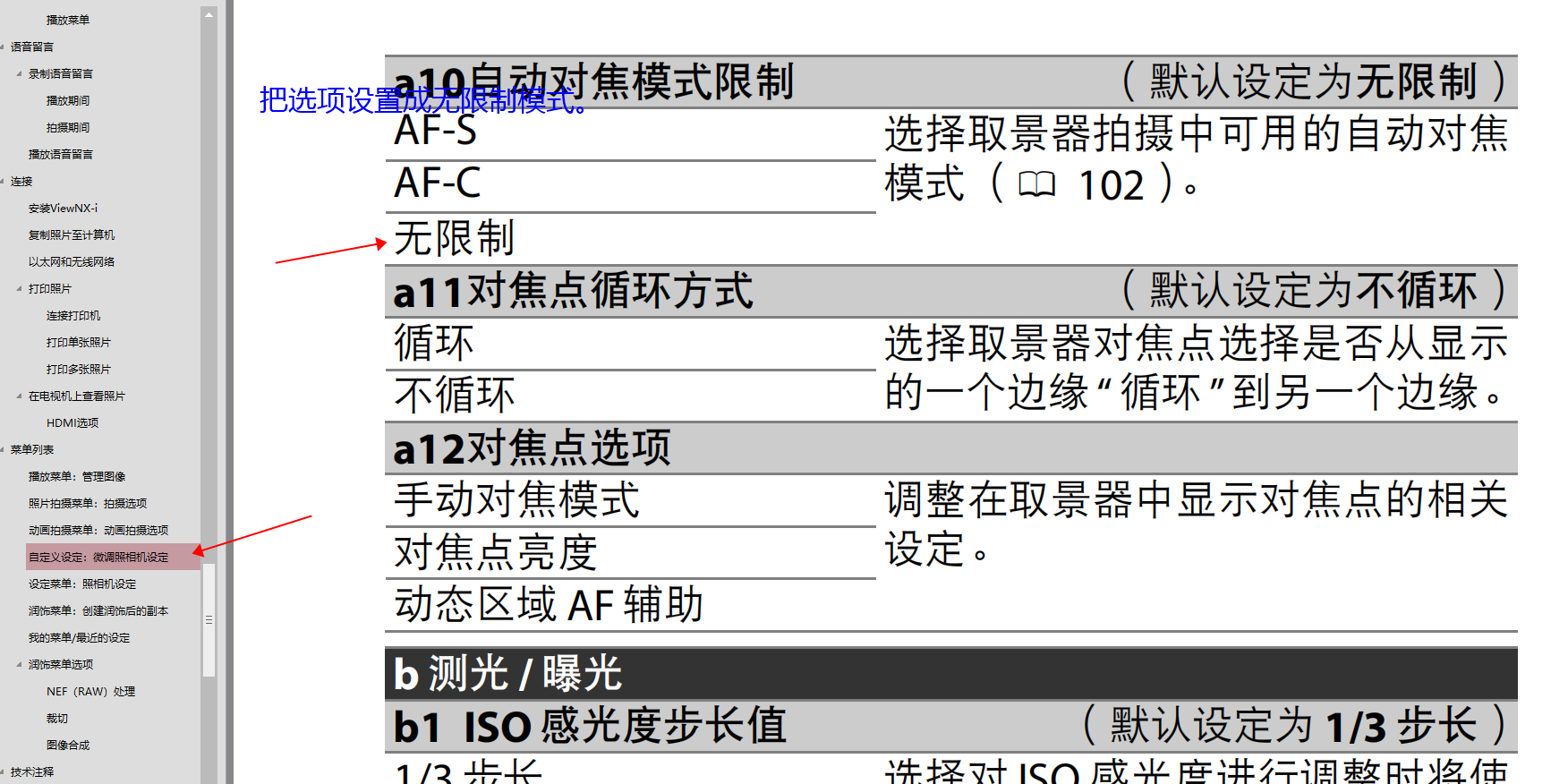
首先按menu进入设置选项,找到铅笔的图案,也就是菜单列表中的自定义设置找到A10选项,把自动对焦模式限制,设置成不限制即可。
app\common\model\Article {#218 #pk: "id" #table: "LB_article" #type: array:1 [ "create_time" => "timestamp" ] : array:14 [ "id" => 1017 "pid" => 8 "title" => "关于尼康D5 使用过程中无法切换,AF-S AF-C对焦模式切换的解决方法" "click" => 15159 "recommend" => null "defined" => "作者:刘斌,时间:2018年8月1日,关于:" "content" => """ <p>\r\n \t<img width="1729" height="876" style="width:929px;height:531px;" alt="" src="http://www.bjfqy.com/images/upload/image/20180801/20180801202538_66263.png" />\r\n </p>\r\n <p>\r\n \t首先按menu进入设置选项,找到铅笔的图案,也就是菜单列表中的自定义设置找到A10选项,把自动对焦模式限制,设置成不限制即可。\r\n </p> """ "image" => "" "keywords" => "D5 对焦模式调整 自动对焦 手动对焦 afs afc 对焦模式切换" "description" => "感谢您对北京风清扬摄影的支持,祝您购物愉快。" "sort" => 0 "status" => 1 "create_time" => think\model\type\DateTime {#224 #data: DateTime @1533126446 {#225 : 2018-08-01 20:27:26.0 Asia/Shanghai (+08:00) } #format: "Y-m-d H:i:s" } "update_time" => null ] : array:14 [ "id" => 1017 "pid" => 8 "title" => "关于尼康D5 使用过程中无法切换,AF-S AF-C对焦模式切换的解决方法" "click" => 15159 "recommend" => null "defined" => "作者:刘斌,时间:2018年8月1日,关于:" "content" => """ <p>\r\n \t<img width="1729" height="876" style="width:929px;height:531px;" alt="" src="http://www.bjfqy.com/images/upload/image/20180801/20180801202538_66263.png" />\r\n </p>\r\n <p>\r\n \t首先按menu进入设置选项,找到铅笔的图案,也就是菜单列表中的自定义设置找到A10选项,把自动对焦模式限制,设置成不限制即可。\r\n </p> """ "image" => "" "keywords" => "D5 对焦模式调整 自动对焦 手动对焦 afs afc 对焦模式切换" "description" => "感谢您对北京风清扬摄影的支持,祝您购物愉快。" "sort" => 0 "status" => 1 "create_time" => think\model\type\DateTime {#224} "update_time" => null ] : array:14 [ "id" => "int" "pid" => "int" "title" => "string" "click" => "int" "recommend" => "string" "defined" => "string" "content" => "string" "image" => "string" "keywords" => "string" "description" => "string" "sort" => "int" "status" => "int" "create_time" => "timestamp" "update_time" => "int" ] }
首先按menu进入设置选项,找到铅笔的图案,也就是菜单列表中的自定义设置找到A10选项,把自动对焦模式限制,设置成不限制即可。